

A jQuery plugin for getting, setting and replacing the selected text in input fields and textareas.This jQuery plugin is for easily finding the starting and ending positions of selected text in text fields and textareas. It can also be used to set the selection, and replace the selection with given text (or insert text wherever the cursor is in the text field or textarea).


Expanding Search Bar Deconstructed with JavaScript & CSS3

One of the things we thought might be nice to change is the search input. We’ve put it from the sidebar into the header and we use a common effect where you have to click to expand the input. We have received many requests on explaining how we did it and today we’d like to show you how to create a search input like that from scratch. The aim is to maximize compatibility for mobile devices and older browsers (down to IE8). Although this might seem like a super-easy thing, we’ll have to apply some tricks in order to make it work properly.
Flexy Menu : jQuery Responsive Horizontal & Vertical Menu with CSS3

Flexy is a menu component based in CSS and Javascript code. You can use Flex Menu it as a horizontal or vertical menu. It is a responsive and collapsible menu, suitable for any type of website.
Features:
- Responsive layout
- Horizontal and Vertical
- 8 Styles
- Javascript/CSS effects
- Collapsible
- Major browsers compatible
Pongstagr.am : jQuery plugin that display instagram photos to website

A jQuery plugin that lets you display instagram photos to your website. For the most part, Instagram’s API only requires the use of a client_id. A client_id simply associates your server, script, or program with a specific application. However, some requests require authentication – specifically requests made on behalf of a user. Authenticated requests require an access_token. These tokens are unique to a user and should be stored securely. Access tokens may expire at any time in the future.
How to build a realtime jQuery plugin

The jQuery realtime library is a first attempt at making it really easy for anybody to add realtime data to a web page by just adding markup to a page and using jQuery and a jQuery library.
In this tutorial we’ll create a jQuery plugin that makes it really easy to add realtime content to a page by simply adding some markup. First, we’ll cover how to use a service called Pusher to subscribe to realtime data. Then we’ll define a way of marking up an HTML5 document with ‘data-*’ attributes in a way which can then be queried by our realtime jQuery plugin and converted to realtime data subscriptions. Finally, we’ll create the jQuery plugin which will use the attributes to subscribe to data and instantly display updates within the page.
Creating Swipeable Side Menu in jQuery

Today, I will be sharing an experiment to replicate the behavior of the side menu, similar to what you’ve seen on smartphone applications, but this tutorial is for the web. I will take you through each step from structuring your layout and adding swipe gestures to open/close the menu, usable on both desktop and smartphones.
form2js : jQuery library for collecting form data
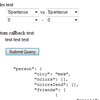
Convenient way to collect structured form data into JavaScript object. Because everything is better with jQuery, jQuery plugin added, check out jquery.toObject.js.
This is not a serialization library. Library used in example for JSON serialization is http://www.json.org/js.html Structure of resulting object defined by name attribute of form fields. See examples below. All this library doing is collecting form data and putting it in javascript object. Obviously you can get JSON/XML/etc string by serializing it, but it’s not an only purpose.
Nifty Modal Window Effects with CSS3 & JavaScript

Today we want to share some ideas for modal window effects with you. There are infinite possibilities for transitioning the appearance of a dialog box and we wanted to provide some ideas of how to show dialog boxes and provide some inspiration.
The idea is to have a trigger button (or any element) which will make a modal window appear on click using a simple transition (or animation).