Slimmage : Sane & Simple Responsive Images

    Slimmage : Sane & Simple Responsive Images

    Your wait for a sane, easily managed path to responsive images has now ended.With Slimmage, CSS controls which image size is downloaded, not HTML

    Features:

    • Media queries, breakpoints, nested percentages, & max-width work as expected.
    • Works on > 99% of browsers. 3KB minified vanilla js, 1.5KB compressed.
    • Cookie-free; works on first page load. Works with CDNs.
    • Fully accessible; degrades gracefully without javascript
    • Massive bandwidth reduction. No duplicate requests. Can auto-enable WebP and adjust compression based on pixel density
    • Works with any RIAPI-compliant backend. ImageResizer is preferred.
    Strength.js : Ultimate jQuery password input plugin

    Strength.js : Ultimate jQuery password input plugin

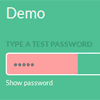
    The ultimate jQuery password input plugin. Featuring secure strength indicator and hide/show password.

    Strength.js provides a toggle feature for password input fields that allows the user to view or asterisk the password. It also features a strength indicator to show how secure a users password is.

    Controlling History: the HTML5 History API with jQuery

    Controlling History: the HTML5 History API with jQuery

    Today we’re going to look at a way to keep a sense of consistency on your website by maintaining the state of some elements even when the user navigates through history. We’re effectively going to create history-inactive areas which remain in the same state while the rest of the document is navigable.

    This technique effectively allows ‘selective’ loading of elements. Effectively, if the user clicks a link or presses the back button, instead of loading the whole page (most of which stays constant, like script and stylesheets), we will only load the stuff that changes, i.e. the content. By doing this we save load times There are two main reasons why you would want to only load certain elements when your user uses the back and forward button to navigate through history. This cuts out all the unnecessaries and creates a faster web experience.

    Easiest Way to Retrieve Twitter Timeline with PHP & jQuery

    Easiest Way to Retrieve Twitter Timeline with PHP & jQuery

    Twitter terminated its old API, and all of our Twitter tutorials have stopped working! So, here is a follow up to show you how easy is it to retrieve user timeline and hashtag with Twitter REST API 1.1. Of course, I don’t just stop there. I integrated my previously written script and modified it to work with Grid-A-Licious plugin to create something that’s similar with Pinterest.

    jHtmlArea : WYSIWYG HTML Editor for jQuery

    jHtmlArea : WYSIWYG HTML Editor for jQuery

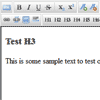
    A simple, light weight, extensible WYSIWYG HTML Editor built on top of jQuery. This component allows you to easily display a WYSIWYG HTML Editor in place of any TextArea DOM Elements on the page.

    Vertical Responsive Navigation with jQuery & CSS3

    Vertical Responsive Navigation with jQuery & CSS3

    Vertical Responsive Navigation is a navigation component based in CSS and Javascript code. It’s responsive navigation, collapsible on mobile devices, has two themes and 12 preset colors.

    Features:

    • Light and Dark themes
    • 12 preset colors
    • Responsive
    • Collapsible
    • Major Browsers Compatible
    • 361 icons available

    visualNav : jQuery navigation menu with smooth scrolls into view

    visualNav : jQuery navigation menu with smooth scrolls into view

    A jQuery plugin that modifies a navigation menu to highlight / change when the menu’s target smooth scrolls into view.

    Features:

    • Smooth scrolling page navigation.
    • Easing can easily be defined for both horizontal and vertical scrolling.
    • Auto-updating menu which highlights both the currently viewed content & other content in view.
    • User can cancel auto-scroll by pressing any key, clicking on the page or scrolling the mousewheel.
    • Can be set up to work with any menu elements. Integrates easily with Bootstrap!

    Create a Vertical, Horizontal and Diagonal Sliding Content with jQuery

    Create a Vertical, Horizontal and Diagonal Sliding Content with jQuery

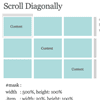
    In this tutorial, we will learn to scroll your web content vertically, horizontally and plus diagonally! Don’t worry, we won’t rely on javascript too much, we will use css/html for the layout and javascript only do the scrolling. And hey, it will still work even if your browser doesn’t support javascript.

    jQuery and PHP powered Easy Form

    jQuery and PHP powered Easy Form

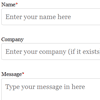
    Looking for a simple contact form that has nice, user friendly validation? You’ve found it.This form loves validation. All fields (except for Company) are all validated through jQuery and PHP. JavaScript mainly for normal users who just love to fill in forms (and to save sending unnecessary requests to the server). PHP validation for those who love to try to break forms or just simply have JS disabled.

    Features:

    • jQuery animation for validation rules.
    • JavaScript validation so no page reload! Saves bandwidth.
    • PHP validation if the user has JavaScript disabled the form will still validate.
    • Field specific validation, phone requires numbers, email requires a valid email format etc.
    • Anti spam measures (captcha) to deter spam emails. Easy to read.
    • Very easy to implement into an existing HTML or PHP web page. ‘Plug in and Play’ – Simply change the email address and place on your page.
    • Thank you message animation on submission.
    • Error message animation without reloading the page on submission attempt.
    • Customise the HTML email message that is sent

    Scroll Activated Fixed Header Animations with jQuery & CSS3

    Scroll Activated Fixed Header Animations with jQuery & CSS3

    It’s become somewhat of a trend in web design to have a header that attaches to the top of the page as the user scrolls in order to provide the user with navigation or something along those lines. When the header attaches to the screen, we can use this point to create some pretty cool effects. In this tutorial we’re going to be looking at animations that activate as the user scrolls down.