
A tutorial that shows how to recreate the four tiles slideshow effect seen on the website of Serge Thoroval. Using 3D transforms, transitions and animations, the aim is to implement a smooth effect and add some variations.


Create a Masked Background Effect With CSS
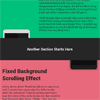
Today we’re going to be stepping through a really cool technique you can use to create an effect that’s a little bit like parallax scrolling, yet doesn’t need any JavaScript; it can be achieved very simply through pure CSS.
This technique could be used to create great product description pages, or even something akin to a Powerpoint/Keynote presentation, and would be a great potential fit for online story illustration.
HTML5 MP3 Sticky Player WordPress Plugin
MP3 Sticky Player WordPress Plugin is a powerful responsive HTML5 mp3 player for your wordpress website that can be added at the top or bottom of the window, it runs on all major browsers and mobile devices like iPhone, iPad, IOS, Android, Windows8.There are five playlist types, the first playlist type is the normal type that allows to add tracks (mp3’s files) with a high degree of customization, the other four playlist types can be created with a single data source URL that can be loaded from Soundcloud, Official.fm, Podcast or generated from a folder with mp3 files.

jQuery Museum : A zero-clutter jQuery Image Gallery

A zero-clutter jQuery image gallery lightbox that works well on desktop & mobile. Single file. No animations or styling.
Features:
- Single file.
- Works well on desktop & mobile.
- Clicking the image (or hitting arrow keys) goes to the next one.
- Clicking outside the image (or hitting escape) closes the overlay.
- Images can be deep-linked (uses URL hash).
- The browser back button is respected.

jQuery.minical : A lightweight Datepicker plugin

Minical is teeny (~300 lines of Coffeescript), and has no dependencies other than jQuery, its icon PNG and stylesheet (which has SASS variables for easy customization).
It has full keyboard support and also defaults to make the associated input read-only, so its value can only be changed by the date format specified in the plugin, alleviating unexpected JavaScript date-parsing drama. (It also works great on mobile, with just enough touch event handling to behave properly.)