
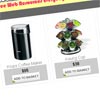
Here is the complete animated shopping cart with php , Ajax and jQuery.
Best jQuery Web Plugins & Tutorials with Demo

Feature Table Design with jQuery

“I ran into the feature table design and I was inspired to try and replicate it. First in Photoshop, then in HTML/CSS. Recreating cool stuff you find on the web is definitely an excise I recommend (a few days after, I read this – couldn’t agree more). As these exercises typically do, it lead me down some interesting paths.”


Create Microsoft Office Minibar with jQuery and CSS3
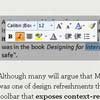
Although many will argue that Microsoft products are an example of a good design, Minibar was one of design refreshments that came out with the Office 2007. It is a variation of a toolbar that exposes context-related functionality. In case of MS Word, context is a text selection. Since Minibar always pops up near the mouse pointer it enables users to quickly perform actions related to a selection.

jQuery Masonry : Cascading grid layout library

Masonry is a layout plugin for jQuery. Think of it as the flip side of CSS floats. Whereas floating arranges elements horizontally then vertically, Masonry arranges elements vertically then horizontally according to a grid. The result minimizes vertical gaps between elements of varying height, just like a mason fitting stones in a wall.
How To Create A Sexy Vertical Sliding Panel Using jQuery And CSS3

So, what about a vertical sliding panel that would act as some sort of drawer instead of the usual top horizontal sliding panel that pushes everything else down when it opens? While thinking of alternatives to the usual horizontal panels, the author thought it would be nice to create something that works in a similar way, but that is a bit more flexible.


