
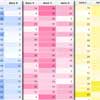
Add more excitement to data tables using jQuery and conditional formatting to generate flexible data “heat maps”. Long tables of numbers are never fun to look at and when presenting this kind of data on the web, where attention spans are already at their limits, you need to be able to present the highlights as quickly as possible. Data heat maps provide the perfect way of taking ordinary data and creating something more visually appealing and informative.
Best jQuery Web Plugins & Tutorials with Demo

Flexible Slide-to-top jQuery Accordion

In today’s tutorial we’ll be creating a simple responsive accordion that, when opened, will slide to the top of the viewport and reveal the content by fading it in. The idea is to avoid that the user has to scroll the content area into place. We’ll also add some nice CSS3 transitions for the arrow to appear and to rotate when we click on an item. The accordion will be flexible, meaning that it will have a liquid width adjusting to the screen size.
Scrollbar Visibility with jScrollPane
Sometimes it can be very useful to hide the scrollbar of elements in a website and only show it when the user really needs it. The real-time activity feed in Facebook is an example for such a behavior. Today we want to show you how to use jScrollPane and extend it with the functionality to hide the scrollbar and show it on hover.
HTML5 File Uploads with jQuery

Today we will be developing a small web application called Upload Center, that will allow people to upload photos from their computers by dragging and dropping them onto the browser window, possible with the new HTML5 APIs exposed by modern browsers.
The photos will have a preview and a progress bar, all of which controlled on the client side. Currently, the photos are only stored in a folder on the server, but you could improve it any way you like.
jQuery Pagination
I’ve been working on a generalized solution for long in order to combine the variety of needs that are imposed on such a navigation to finally put an end to blocks of code that are copied from one project to another with the consequence that it gets no longer understood over the time.
The result of these efforts is my third jQuery plugin that has another big advantage over server side pagination; by generating the links virtually on the client, the risk of duplicate content drops and the need of ugly follow, noindexlink attributes left unnecessary. The pagination plugin also combines a varity of features. It can be used to divide long lists or areas of content into multiple seperate pages, load paged content with pre-calculated database offset-parameters via Ajax and anything with full control to adapt the style properly to your site-layout.

Create Sticky Notes To-Do List In CSS And JQuery

In this tutorial you will learn how you can create your own simple To-Do list using CSS and JQuery.
First you will design the To-Do list, this is going to be a simple form where you can quickly add your tasks for the day.
Then we will learn how to take this list and turn the items on it into Sticky Notes so you can display this information in a graphical way to help you remember.

jPList : jQuery List Handling plugin

jPList is a jQuery plugin for sorting, paging and filtering any content, such as DIVs, lists and tables.
- Works with any content (tables, lists, div elements)
- Seo friendly
- Paging
- Filtering
- Ascending or descending sorting
- Alphabetical or numerical sorting
- Sorting, paging and filtering state can be saved in cookies.


