
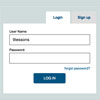
This post is very basic level CSS implementation. I want to explain how to design tab style login and registration panel with CSS, HTML and Jquery. Tab system help you to save page space, Just take a quick look at these four steps, use it and enrich your web projects.
Best jQuery Tabs Plugins & Tutorials with Demo

Slider Kit – Multiple Slideshow Types In One jQuery Plugin

Slider Kit is a very flexible jQuery plugin that enables us to create almost any type of slideshows like photo galleries, news sliders, carousels,tabs,menu and more.
It has support for both horizontal + vertical sliders and items can be navigated via buttons, mousewheel, image click or keyboard.


Quicksand filtering items jQuery plugin

Quicksand is a jQuery plugin is very functional for reordering and / or filtering items by dragging a good animation. All you need do is provide two sets of items. You can do this in several ways:
* Using basic HTML, such as an unordered list
* Downloading data with Ajax calls
* HTML items to change with JavaScript
jQuery Content Panel Switcher

The jQuery Content Panel Switcher is a simple, very lightweight jQuery plugin that allows smooth transitioning of content in and out of panels located anywhere on the page. You can have single or multiple content switching panels on a single page Content panels can be either span or div elements, and the buttons used to switch the content can be just about anything, so long as they have the right clases assigned.

Easy Display Switch with CSS and jQuery

Today, I would like to go over a quick and simple way to allow your users to switch page layouts by using CSS and jQuery.Today’s web users expect web pages to be increasingly more interactive. To this end, the ability to change page layouts provides your users with a more immersive experience and allows them to consume information more easily, either with a quick gallery view, or a detailed summary view.


