

Turn a multiselect list into a nice and easy to use list with checkboxes.
Best jQuery Plugins Plugins & Tutorials with Demo



Horizontal Timeline with CSS3 & jQuery

An easy to customise, horizontal timeline powered by CSS and jQuery.
Building a horizontal timeline was a bit tricky, because you can’t rely on the vertical (more intuitive) scrolling behaviour. We decided to separate timeline and events, with the first one working like a slider, while the second one occupying the full width and showing a single event at a time.
sPlayer : Super HTML5 Music Player

sPlayer is pushing HTML5 to the limit, it’s almost certainly the first HTML5 music player of it’s kind, Making it the most feature-rich JavaScript Audio library.It also allows you to create a Cross-platform HTML5 Music Desktop App with powerful capabilities.
- Pure HTML5: Taking advantage of HTML5 power and speed, No Flash, just pure HTML5.
- Playlist: Multiple playlists support.
- Audio Controls: Play, Pause, Next, Previous, Seekbar, loop, duration, current time.
- Radio / Live Stream: Radio / Live Stream Remote URLs / Broadcasts such as SHOUTcast and Icecast are also supported.
- Multiple Audio Formats: MP3, OGG, OGA, AAC, M4A and MP4.
- HTML5 Desktop App Ready: Build powerful HTML5 Music Desktop app with sPlayer and Electron.io (Atom-shell) / NW.io (Node-webkit).
- Live Search: Built-in Instant search to find a specific song in your playlists.
jQuery Responsive Tables
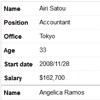
A lightweight jQuery plugin that allows table markup to become fully responsive. It provides a clean list view via devices with small screens. It can work for multiple tables on a single page, as well as with tables that contain various combinations of merged cells. Best of all, it uses pure CSS for the rendering.
Hashtegny : jQuery Plugin for Aggregates Hashtags

- Aggregates hashtags from different social media networks.
- Displays the posts in a grid and animated layout.
- Works on different screen sizes.
- It automatically updates the time stamp of each post.
- It automatically adds recent posts if any.
- Posts are sorted according to the time they were created at.
- Posts are clickable.
Create a month picker jQuery plugin

Where we create a month and year user friendly picker as a jQuery plugin.
The plugin enables users to click any HTML element, but usually a link or button, and be presented with a popup where they can select a year and a month. The plugin then updates the clicked element content with the selected month and year, and call a callback provided. The popup at that stage closes.


