Best jQuery Plugins Plugins & Tutorials with Demo

    jQuery Animated Percentage Loader

    jQuery Animated Percentage Loader

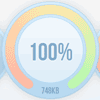
    jQuery.PercentageLoader is a jQuery plugin for displaying a progress widget in more visually striking way than the ubiquitous horizontal progress bar / textual counter. The plugin takes miniminal installation and is simple and flexibile to use. It makes use of HTML 5 canvas for a rich graphical appearance with only a 10kb (minified) javascript file necessary (suggested web font optional). It uses vectors rather than images so can be easily deployed at various sizes by simply adjusting the initial parameters.

    A jQuery plugin that utilises HTML canvas to show an animated percentage loader widget suitable for loading screens or displaying feedback during long-running tasks.
    OmniWindow : extremely customizable modal plugin for jQuery

    OmniWindow : extremely customizable modal plugin for jQuery

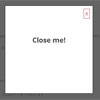
    Extremely customizable modal window plugin for jQuery with 139 lines of code, written specially for programmers.If you want to use your own names for modal and overlay classes, you can set them as options.OmniWindow uses two events to show and hide windows. You can trigger this events any time you need.OmniWindow uses this event name as trigger value to emulate mouse click on overlay.OmniWindow uses this event name to subsribe to ESC keyup.

    nestedSortable jQuery plugin

    nestedSortable jQuery plugin

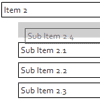
    nestedSortable is a jQuery plugin that extends jQuery Sortable UI functionalities to nested lists.

    Features:

    • Designed to work seamlessly with the nested set model (have a look at the toArray method)
    • Items can be sorted in their own list, moved across the tree, or nested under other items.
    • Sublists are created and deleted on the fly
    • All jQuery Sortable options, events and methods are available
    • It is possible to define elements that will not accept a new nested item/list
    • It is possible to define a maximum depth for nested items

    Barcode : jQuery Plugin to Create Barcode online

    jQuery plugin : barcode

    To use this plugin, simply define a container to host the visual barcode.The BCC library is a open-source library for barcode generation with the objective to be ported in as many language as possible.
    Each port will contain the version number of the BCC library and the version number of the port.

    jQuery TimePicker

    jQuery TimePicker

    jQuery TimePicker is a plugin to help users easily input time entries. It works by allowing the user to type times in a free format or selecting them from a dropdown menu.A jQuery plugin to enhance standard form input fields helping users to select (or type) times.

    The plugin will automatically convert all time entries to a format that can be changed passing the timeFormat option.

    ContentFlow : JavaScript flexible Coverflow Slider

    ContentFlow : JavaScript flexible Coverflow Slider

    ContentFlow is a flexible CoverflowTM / ImageFlowlike flow written in javascript, which can handle any kind of content.

    With ContentFlow it is now possible to have any number of flows within one web-page. Each separately configurable, satisfying different visual needs.

    • It’s easy to implement and to extend.
    • It can auto generate reflections (clientside)!
    • You can add and remove content items on the fly
    • You are free to define your own methods for displaying content and interacting with it.
    • You can control all aspects of the flow without loosing the ease of use.

    ContentFlow can handle different kinds of control, like keyboard and mouse, and can be used with and without a reflection. For a complete list of features and compatibilities take a look at the feature list.

    jQuery Verbose Calendar

    jQuery Verbose Calendar

    Why another jQuery calendar? I needed something very specific for a personal project which led me to created this calendar. After making it I thought it was pretty neat.You’ll have to source the calendar JS, the calendar CSS, and jQuery. The implementation is straight forward if you check out the example.

    Map Widgets for jQuery

    Map Widgets for jQuery

    Quickly create stunning highly styled jQuery and Google Maps v3 based maps for your next business directory, real estate guide, or travel site project. Included 2 power widgets and 3 themes with custom markers and original PSDs. Saves 60 hrs of work, installs in minutes.

    Welocally Maps Quick Widgets is a set of jQuery based javascript widgets that make it easy to create highly styled customized maps using Google Maps API v3. Its perfect for creating business directory websites, travel sites, real estate guides or any website where you want to go beyond the look and feel of Google Maps and showcase real world places.

    Simplifies the Google Maps v3 API

    • 2 Widgets Included, Place Widget and Interactive Multi Place Widget
    • 3 Themes with custom marker and icon photoshop files included
    • Package includes working demos with installation and styling guides

    jqBarGraph : jQuery Bar Graph Plugin

    jqBarGraph : jQuery Bar Graph Plugin

    jQuery plugin for creating bar graphs from your data. jqBarGraph is compatible and fully tested with Safari 2+, Internet Explorer 6+, Firefox 2+, Google Chrome 3+, Opera 9+.

    There is two type of data array for jqBarGraph. First is for simple bar graph type, and second is for multi and stacked bar type.For simple bar graph type data for one bar should look like this: [value, label, color]. Label and color are optional. For multi and stacked type of graph you should send data in next format: [[value1, value2, value3, …, valueN], label].

    Chronoline.js : A JavaScript Library For Displaying Timeline Of Events

    Chronoline.js : A JavaScript Library For Displaying Timeline Of Events

    chronoline.js is a library for making a chronology timeline out of events on a horizontal timescale.From a list of dates and events, it can generate a graphical representation of schedules, historical events, deadlines, and more.Currently, chronoline.js only requires raphael.js to function. jQuery/qTip2 are used to provide nicer tooltips, but these aren’t required.

    To use it, provide a target element and an array of dates (possible ranges) with event descriptions, and it will render the contents of the timeline.

    There are a variety of options provided, which you can see in the JavaScript itself. They are currently (and will likely always be) quite idiosyncratic and represent the degrees of control needed for the projects this has been used for.