

Voting system can be important part of any website, especially if you want to keep track of user ratings. Let’s create a cookie based voting system, similar to YouTube like & dislike buttons (Thumbs up & Thumbs down), which can be applied to any content in php and jQuery.
Best jQuery PHP Plugins & Tutorials with Demo
Crawl Web Pages In PHP And jQuery

You All know Google used to crawl web pages and index them into there database of millions and trillions of pages they use a great software called spider to perform this Process this spider will index all the web pages in the internet with great speed like the same way i coded out a simple mini web crawler crawls the specific webpages and get out there links and displays it, i used PHP and Jquery to perform this actions when a people types the url and clicks crawl the software crawls the whole web page and displays the link present in it and you can see the demo here and download the script for free
jQuery Contact Tabs Plugin
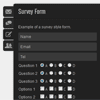
A jQuery form generator for creating unlimited slide-out or static contact tabs containing AJAX powered customised forms. Plugin includes 12 different form elements and client-side validation.
Both “light” and “dark” skins available. Add multiple tabs, each with its own custom form or use the built-in default standard contact form. All form HTML and styling generated by the plugin.
Features:
- Create custom forms with 12 different form elements
- Submit form via AJAX
- Display either using slide out tabs or static tabs in your page content.
- Fully flexible positioning.
- Position sliding tabs relative to browser window or within the page content.
- Includes validation options for form input
- Includes both light & dark skins
- Includes sample PHP file for sending email via PHP mail or SMTP (using PHP SMTPClient class)
- Option to load open for slide out tabs.
- Control order of tabs & select default tab on page load.
- Show/hide slide out tabs or change active contact tab using external links.
uLike : Ajax content like system with jQuery

uLike is a simple and easy to install content like system. You can have a unique like button on each different content element on your page. Each like button is it’s own seperate identity and is stand alone from the others. The system is based on the content’s parent div, the ip of the user, and the page in which it’s on.
Features:
- Allow your visitors to like your content!
- Jquery Plugin utilizing Ajax & php
- Seperate like buttons for each content area you specify
- Likes are based on IP address, so, one like for one user
- Like buttons are based on parent element, ip address, and page
Make Pretty Charts For Your App with jQuery and xCharts
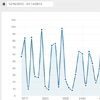
Charts are a great visual aid when presenting data. You can’t build a professional admin panel without them. They are also tricky to set up. However, there is a new library that makes things easier – xCharts. Today, we are going to use it along with the daterange picker for Twitter Bootstrap, to build a pretty, AJAX-powered chart for your web application that fetches data from a MySQL table.
ParamQuery Grid : jQuery Grid Plugin
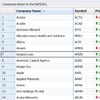
ParamQuery grid is a lightweight jQuery grid plugin inspired by MS Excel and Google spreadsheet. It’s based upon jQueryUI Widget factory which is an excellent design pattern for UI controls with consistent API.
Features:
- Sorting
- Paging
- Resizable columns
- Resizable height and width
- Customizable theme
- Hiding / Showing columns
- Freeze any number of Columns like Excel
- Display any data source format like HTML, Array, XML, JSON, etc
- Can be used with any server side framework e.g. ASP.NET, MVC3, JSP, JSF, PHP, etc
- Virtual Scrolling and Rendering
- Inline Editing of cells
- Supports all the major browsers and has been tested in IE 6,7,8, Firefox, Chrome, Opera, etc
Metro Login with jQuery & CSS3

This is a Login form that use CSS3 and jQuery Tricks to look like windows 8 login screen.The PHP side, you have an easy way to get the username, password, remember me checkbox, selected background color and selected background image. So you can store those values to restore them later.
Also works on tablets and mobile devises.Inside of this package, there is a document that explain the code. I also give you a couple of functions that can change the buttons and backgrounds easyly
Build a Simple Yahoo! Answers API Webapp with PHP & jQuery
In this tutorial I’d like to focus on the Yahoo! Answers API. We will be creating a simple webapp that pulls all recently answered questions from a select few categories. The API delivers results via XML or JSON, so we have the option to build with any backend programming language. Although for this guide I’ll stick to PHP since it’s the most commonly understood backend language.
Creating Custom File Input With PHP, CSS3 and jQuery
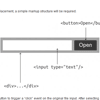
This tutorial will help you in developing jQuery plugin which will assist you to replace that complex file input with support for multiple files.You must be knowing that file inputs are very limited in terms of customization and many complex plugins are avaialble with multiple evacuations that allows you to customize those file inputs, but its is still a challenging task to get it worked.
JavaScript Gauges in Metro Style
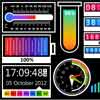
JavaScript Gauges in Metro Style is a set of 8 gauges created in the modern Windows8 or Metro style which can be added to virtually any web application: ASP, ASP.NET, PHP, JSP, ColdFusion, Ruby on Rails, and simple HTML pages.The gauges included into the package are not just separate meters, sliders, etc. They can be used as full featured ready gadgets intended to display the information in a visually appealing way.
Features:
- Cross-platform compatibility. The gauges can be used on any platforms: ASP, ASP.NET, PHP, JSP, ColdFusion, Ruby on Rails and simple HTML pages and accessed from any devices: desktop, laptop, mobile (including iPhone and iPad), and via any browsers: IE, Mozilla Firefox, Google Chrome, Opera, Safari, etc.
- Declarative description. The gauges are described using declarative selection of the parameter in JSON.
- Customization. You can set any parameters describing your gauge and create custom objects using JSON.
- Interactivity and Animation. Every gauge provides customizable interactivity and animation.
- Easy styling. A gauge styling can be easily modified in CSS.
- Callback support. You can get notifications about changes of the gauge value and handle it in JavaScript.
- Easy integration. To integrate a gauge you just need to specify gauge name and area of a webpage where it should be inserted (“div” tag); and all this with JavaScript.
- WinRT compatible. The gauges can be integrated into HTML5-based WinRT applications to effectively visualize data.


