

CSS Menu with visual effect powered by jQuery. Javascript is used for effects only. Full cross-browser compatibility including IE6. Effects: smooth fade animation on mouse over and unfold submenu appearance. Easy-to-setup: simple nested unordered list for menu items with unlimited levels.
Best jQuery Menus Plugins & Tutorials with Demo
jQuery contextMenu
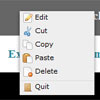
The jQuery contextMenu Plugin was designed for web applications in need of menus on a possibly large amount of objects. Unlike implementations as a beautiful site’s or trendskitchens’ this contextMenu treats the menu as the primary object. That means, that a single menu is defined that can be used by multiple objects. Unlike the mentioned plugins, contextMenu doesn’t need to bind itself to triggering objects. This allows injecting and removing triggers without having to re-initialize or update contextMenu.
Multi Level Hierarchical jQuery Menu: jQSimpleMenu

As your website grows, so does the need for better navigation and sometimes the navigation becomes the driving force for better user experience. jQSimpleMenu is a multi-level hierarchical jQuery drop down menu that helps you add drop down menu in your website without writing a single line of code.

Flexible Slide-to-top jQuery Accordion

In today’s tutorial we’ll be creating a simple responsive accordion that, when opened, will slide to the top of the viewport and reveal the content by fading it in. The idea is to avoid that the user has to scroll the content area into place. We’ll also add some nice CSS3 transitions for the arrow to appear and to rotate when we click on an item. The accordion will be flexible, meaning that it will have a liquid width adjusting to the screen size.


Highlight Web Page Elements With jQuery Highlighter

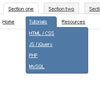
jQuery Highlighter neatly highlights the web page elements and helps you to direct your readers to the places you want them to look.
This jQuery plugin is handy for products showcases, guided tours, portfolios and helpful for the color blind & visually impaired people.
It is highly customizable and has built-in support for keyboard navigation. The plugin works fine on Chrome, Firefox and Safari (issues with IE).


