

Today we want to show you how to create a horizontal layout in jQuery and CSS3 with several content panels. The idea is to make each panel individually scrollable and animate a content panel to the left of the viewport once it’s clicked or selected from the menu. The challenge is to deal with different viewport sizes meaning that we will change the layout if the screen is not wide enough in order to be stacked vertically instead of horizontally.
Best jQuery CSS2 / CSS3.0 Plugins & Tutorials with Demo
JavaScript Browser Determiner
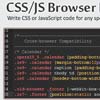
It is a lightweight (4kb) JavaScript library that can help web-developers, especially HTML/CSS coders, to easily write CSS or JavaScript code for any specific browser without any CSS hacks. It is indispensable solution for building cross-browser and cross-platform web-sites and web-applications.
How it works? Very simple. It generates a list of classes with the detailed information about browser, layout engine, OS, device and then attach it to <html> tag.
Unlike well-known Modernizr, the CSS/JS Browser Determiner is mostly focused not on the browser features but on the browser and the device itself. But it also determines the support of common CSS features.
Creating Custom File Input With PHP, CSS3 and jQuery
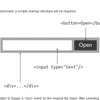
This tutorial will help you in developing jQuery plugin which will assist you to replace that complex file input with support for multiple files.You must be knowing that file inputs are very limited in terms of customization and many complex plugins are avaialble with multiple evacuations that allows you to customize those file inputs, but its is still a challenging task to get it worked.
Photobox: CSS3 image gallery jQuery plugin

Photobox is a lightweight image gallery modal window script which uses CSS3 heavily for silky-smooth animations and transitions. The goal was to great an image gallery script that utilizes GPU rending instead is the 90% scripts out there which are using javascript to move things around the old fashioned way.
Benefits:
- Both the script & CSS are only 7k each (minified script, not gziped)
- Uses silky-smooth, hardware accelerated, CSS3 transitions and animations (for better performance)
- Pretty UI and easy UX
- CSS3 preloader, tailored-made. The only image you need is the arrow.png (soon even not that)
- Works also on IE9 and above, but clearly not as nice as in normal browsers
- Uses event-delegation on all thumbnails events
Create a Pinterest Feed jQuery Plugin Using AJAX & jQuery Isotope

In our latest jQuery social network tutorial we are going to create a jQuery plugin to display Pinterest feeds via AJAX from either a username or pinterest board and display them in a masonry style wall using jQuery Isotope.
The plugin will also include code to display time since posted, options to set the number of feed items to display plus Facebook and Twitter share links to help boost the traffic to your pins.
Live Album Previews with CSS3 and jQuery

Today we are going to make a script for previewing the contents of an album with a slideshow-like animation. This can be used in photo galleries, online shops, profile pages and more. The example is inspired by Facebook, where you hover over an album and get a slideshow of some of the photos contained inside it.
JavaScript Gauges in Metro Style
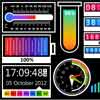
JavaScript Gauges in Metro Style is a set of 8 gauges created in the modern Windows8 or Metro style which can be added to virtually any web application: ASP, ASP.NET, PHP, JSP, ColdFusion, Ruby on Rails, and simple HTML pages.The gauges included into the package are not just separate meters, sliders, etc. They can be used as full featured ready gadgets intended to display the information in a visually appealing way.
Features:
- Cross-platform compatibility. The gauges can be used on any platforms: ASP, ASP.NET, PHP, JSP, ColdFusion, Ruby on Rails and simple HTML pages and accessed from any devices: desktop, laptop, mobile (including iPhone and iPad), and via any browsers: IE, Mozilla Firefox, Google Chrome, Opera, Safari, etc.
- Declarative description. The gauges are described using declarative selection of the parameter in JSON.
- Customization. You can set any parameters describing your gauge and create custom objects using JSON.
- Interactivity and Animation. Every gauge provides customizable interactivity and animation.
- Easy styling. A gauge styling can be easily modified in CSS.
- Callback support. You can get notifications about changes of the gauge value and handle it in JavaScript.
- Easy integration. To integrate a gauge you just need to specify gauge name and area of a webpage where it should be inserted (“div” tag); and all this with JavaScript.
- WinRT compatible. The gauges can be integrated into HTML5-based WinRT applications to effectively visualize data.
How To Build an Alphabetical Page Index using jQuery

In this tutorial we will be creating a simple page index which uses anchor links as stepping stones on the page. However the “jump” will be animated and scroll down to reach the destination. I particularly enjoy this script because it is portable and easy to install into any website layout.
Flippage: Turn pages of your DIVs

FlipPage is a jQuery plugin that creates the illusion of turning the pages of a book.Originally developed for a presentation on touch pad, it can also find its place in an application such as e-book.
This plugin was developed to use HTML5/CSS3 graphic hardware power and thus create a smoother animation.
Merry Scrolling with skrollr.js

A step-by-step tutorial on how to create a beautifully looking Christmassy scrolling effect by Paulina Hetman from Pepsized.skrollr is much more than “just” parallax scrolling. It’s a full-fledged scrolling animation library. In fact, you can use it and still have no parallax scrolling at all. But I wanted to sound hip and use some buzz-words. By the way, skrollr leverages HTML5 and CSS3.
skrollr allows you to animate any CSS property of any element depending on the horizontal scrollbar position. All you need to do is define key frames for each element at certain points in top scroll offset.


