

Loda Button is a simple jQuery plugin animates the button’s icon as the data are being fetched from the server. The classes loda-btn and loda-icon are used by the plugin to style the button. The styling is quite simple and done in loda-button.css. The animation is created using CSS3′s animation, transitions and transforms, which are supported by Chrome, Firefox, Opera, and IE10.
Best jQuery CSS2 / CSS3.0 Plugins & Tutorials with Demo
OWL Carousel : Touch enabled jQuery Carousel Slider plugin

Owl Carousel is a jQuery plugin that allows us to create responsive carousel sliders so quickly. The plugin is touch-friendly and capable of featuring any HTML content with almost any markup.
Features :
- Responsive
- Touch Event
- Mouse Slide Events
- Fully Customizable
- Choose the number of items to be displayed
- Multiple Sliders
- CSS3 3d Transitions
- Custimizable controlls
CSS3 Buttons Generator with jQuery

Use this powerful Generator to generate your own buttons for all your websites. No Image needed.This pack is easily customization, you can change more than 20 parameters, as radius, size, color, border parameters, text parameters etc. in a very easy way.
Features:
- No images requried
- Oncly CSS
- Fully and easy customisable
- 20 customisable parameters
- Only 3 easy steps to follow
- Compatible with all browsers
- No plugin needed
- Instructions & example included
Google Play’s Multi-Level Navigation with jQuery & CSS3

Google have recently released a new Google Play website complete with a new redesign and what caught my attention was the way they implemented their navigation bar. With the smooth animation and how they let users peek at the root-level menu by simply hovering a back button, I decided to build a similar navigation menu from scratch using HTML, CSS and jQuery.
Strapslide : jQuery Responsive Bootstrap Slider Plugin

Strapslide is the ultimate premium Bootstrap Slider Plugin offering the capability to show images, videos and captions paired with simple, modern and fancy 3D transitions. Even more important, it is fully responsive and mobile optimized and can take on any dimensions.
Features:
- jQuery 1.7 – jQuery 2.x Supported
- Based on Bootstrap
- CSS3 Transition library
- Touch Enabled
- Responsive
- Pause on Hover
- Dynamic Pagination
- Keyboard Navigation
- HTML5 Support to play self hosted videos
- Animation of each Caption element
- Powerful CSS Transitions with jQuery FallBack
- Adapts to Bootstrap spans
- Set Fullscreen YouTube and Vimeo Videos
Narsis Cover : jQuery CSS3 Image Hover Animation Effect

Narsis cover is highly customizable CSS3 animation effects for image hover.These Animations is carefully designed with attention to the details. Your visitors will love theme.
Features:
- 50 Animation Effect
- 13 Color Schemes
- We use FontAwesome for icons so you can use more than 360 icons for your menu.
- All HTML5, CSS3 and JavaScript codes are fully validated and cleaned.
- Cross-browser compatible, IE7 included.
- Fully Customizable
Metro Modal with jQuery & CSS3 Animation

Metro Modal, is a jQuery plugin that creates or turn DIVs into modal popups in metro style.The modals are draggable, has controls to Maximize, Close and Restores, basic fadeIn/fadeOut animation for old browsers that has no support for css3 animations.
Features:
- There are 19 properties that you may change.
- 23 different animations.
- Responsive design
- Resize window, also resizes de modal if is needed, animation to move around to the new screen location.
- Support iFrames and custom HTML code
- Support multiple color background with animations, works with HTML color pallet.
Building a Circular Navigation with CSS Transforms & JavaScript
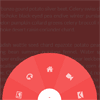
In this tutorial I’m going to show you how to create circular navigations using CSS transforms. I’m going to take you through the steps for creating these styles one by one, and explain the math (yikes!) and simple logic behind them so you get a clear understanding of the technique.
Like I mentioned, there’s going to be some basic math involved, along with CSS transforms to create these styles. But don’t worry, the math is really very simple and I’ll be going through it step by step.
CSS Gradient Generator with jQuery

This is CSS Gradient Generator that you can use in your site to generate CSS Gradient that is cross browser and provides the CSS gradients with all the suffixes.
It gives you the power of that CSS Gradient generator in Adobe Photoshop. You can use it to generate your code in your admin control panel to edit the gradient visually.
Features:
- Cross browsers. 2- 50+ predefined presets.
- 2 themes (Dark & Light).
- Linear & Radial gradients.
- Generates TRANSPARENT steps.
- Very easy to use and to work with.
- Uses RGB, RGBA, HSL, HSLA, HEX.
- CSS3 Gradient for all the BROWSERS.


