

A simple template to showcase your application features through a smooth 3d animation, powered by CSS and jQuery.
Best jQuery CSS2 / CSS3.0 Plugins & Tutorials with Demo


Simple Morphing Search with CSS3 & JS

Today we’d like to share a simple morphing effect with you. The idea is to have a search input in the upper right corner of the page and once the input is clicked, the whole search element expands to a fullscreen overlay. The fullscreen overlay has a bigger search input and some elements for showing related items or the search results. Note that we just made a dummy that does not actually search dynamically.
StickyFooterNav : Responsive Mega Footer with CSS3 & jQuery
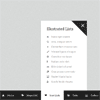
StickyFooterNav is a unique mega footer solution designed and coded to work and fit on any device. It is fully responsive and comes with a flexible grid system to hold your content within panels.
Features:
- 100% Responsive & powerful mega footer system
- 3 types of drop downs (fixed width, mega and full browser width)
- Unique full browser width panels
- Sticks to the bottom of the browser
- Flexible columns grid
- Left or right alignment for the menu items and the drop downs
- Custom & automatic scrollbars within panels
- Clean and professional design
- Fits into any layout
- Lots of styled elements
Slider Pro – jQuery Slider plugin

A modular, responsive and touch-enabled jQuery slider plugin that enables you to create elegant and professionally looking sliders.
Features:
- modular architecture
- responsive
- touch-swipe
- CSS3 transitions
- animated layers (and static)
- infinite scrolling
- carousel layout
- full width and full window support
- thumbnails
- deep linking
- lazy loading
- retina-enabled
- fade effect
- full-screen support
- CSS-only navigation controls (no graphics) for easy customization
- video support
Awesome Shop : Premium WordPress Catalog Grid

Awesome Shop is a premium multi-purpose slider for creating content sliders with must-see effects. It has a beautiful and easy-to-use admin interface with supporting modern features like drag n’drop WYSIWYG slider builder, real-time previews and Google Fonts. It’s device friendly by supporting responsive mode, multiple layouts.
Features:
- Responsive Layout
- Parallax Effect
- Animated Layers
- Google Fonts – over +600 fonts
- Easy setup – Drag&Drop
- No extra coding
- Best for eCommerce


