

In this tutorial we will be creating a simple page index which uses anchor links as stepping stones on the page. However the “jump” will be animated and scroll down to reach the destination. I particularly enjoy this script because it is portable and easy to install into any website layout.
Best jQuery HTML5 Plugins & Tutorials with Demo
jQuery Speedo Popup

Speedo Popup is a small, powerful and real customizable jQuery plugin. Speedo Popup is not just a popup, Speedo Popup is:
- a Popup Plugin
- a Notification Plugin
- a Lightbox Plugin
- an Alert Box Plugin
And that’s not all.
You can play videos, you can make a light box of videos and mixed content or you can notify the user when you want, you have the possibility to do whatever you want.It has full compatibility for HTML5 and full fallback for older browsers.
Flippage: Turn pages of your DIVs

FlipPage is a jQuery plugin that creates the illusion of turning the pages of a book.Originally developed for a presentation on touch pad, it can also find its place in an application such as e-book.
This plugin was developed to use HTML5/CSS3 graphic hardware power and thus create a smoother animation.
zSnow : jQuery/HTML5 snow animation theme

zSnow can make your normal website into a winter/christmas theme! With more than ten options to choose from, you can make it as unique as possible. Each flake is programmed, calculated and generated to behave different than the others. The flakes are easily modifiable PNG images drawn in PS.
Users can enjoy your website even more by playing around with the flakes as each one is completely different and interactive. They will play a tone and fade away as the user hovers them.
Merry Scrolling with skrollr.js

A step-by-step tutorial on how to create a beautifully looking Christmassy scrolling effect by Paulina Hetman from Pepsized.skrollr is much more than “just” parallax scrolling. It’s a full-fledged scrolling animation library. In fact, you can use it and still have no parallax scrolling at all. But I wanted to sound hip and use some buzz-words. By the way, skrollr leverages HTML5 and CSS3.
skrollr allows you to animate any CSS property of any element depending on the horizontal scrollbar position. All you need to do is define key frames for each element at certain points in top scroll offset.
Filter-me : jQuery plugin to filter images using canvas
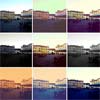
jQuery filter.me is a jQuery dependant script that allows you to apply filters to images using Photoshop .acv Curves Adjustment files. jDataView is used to read the Photoshop file, from which we create a Monotonic Spline Curve representing its data. From this curve the new pixel RGB values can be calculated. These values are then applied using HTML5’s canvas element.
Literally any Photoshop curves file can be applied to multiple images with ease. This is a great alternative to using something like PHP’s imagemagick to try and replicate similar filtering. It can sometimes be a little slow, especially in mobile browsers, but I’m sure this will improve as canvas becomes more mainstream.
MelonHTML5 : jQuery Metro Gallery

Metro Gallery a flexible and easy to integrate photo gallery featured in Metro Design. It allows you to build your unique photo wall with your custom settings.
Features:
- Unique Metro design
- Mobile device ready (phones + tablets)
- 21 different tile sizes
- CSS3 animations + jQuery fallback for IE
- Dynamic layout
- 9 pre-defined themes
- 3 loading animations
- Black & White mode
- Fully customizable

A Simple Parallax Scrolling Technique with jQuery & CSS3

Parallax scrolling is an interesting technique, where, as you scroll, the background images translate slower than the content in the foreground, creating the illusion of 3D depth. As I planned to re-design my personal website, my first goal was to write the shortest and simplest code to achieve maximum awesomeness! I’ll show you how I did it.
Fancy Product Designer : jQuery plugin
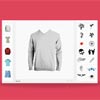
Let me introduce the first Product Designer here on jQueryRain. You can use this plugin for any type of product. Use it as T-Shirt Designer, Business Card Designer, Device Designer….no limits!
You do not need any vectors files for the plugin, you just set png images for your elements and you tell the plugin which element can be colorized by the user. If its can be colorized, the image will be converted in a HTML5 canvas element.
Features:
- Converts png files in HTML5 canvas for colorization
- Let the user add custom texts to the product
- Add unlimited motives
- Colorizable elements by static colors or colorpicker
- Let the user drag, move, remove or rotate the element
- Great API to integrate it in any Shop System
- Add unlimited custom fonts to the font dropdown, you only need the woff file of your font


