Best jQuery Games Plugins & Tutorials with Demo

    PhotoCradle.js : jQuery Gallery Integration with Flickr or Picasa

    PhotoCradle.js : jQuery Gallery Integration with Flickr or Picasa

    jQuery image gallery that delivers photos you store on services like Flickr or Picasa to your personal website or blog.

    Features:

    • Original thumbanails bar
    • On-demand image loading
    • Fast and adaptive fullpage browsing mode
    • Multiple cradles per page
    • Integration with popular services (flickr, picasa)
    • Skins based on CSS theming

    cgSceneGraph : JavaScript & HTML5 Powerful, cross-platform Animation framework

    cgSceneGraph : JavaScript & HTML5 Powerful, cross-platform Animation framework

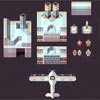
    The cgSceneGraph is a powerful, cross-platform and very easy-to-use animation framework written in JavaScript for the <canvas> tag in HTML5.It’s full object oriented to ease the development of your applications and games.

    The power of the framework is inside its concept : the framework itself does not render anything, and provides a lot of cool and useful features. It was designed to be extended : you can use or create an infinite number of extensions of the node class (CGSGNode) to be rendered. You are not, and won’t never be, limited to what the framework provides by itself because it is designed to be extended !

    CanvasQuery : jQuery Html5 Canvas Library for Game Developers

    CanvasQuery : jQuery Html5 Canvas Library for Game Developers

    Canvas Query is a wrapper library for HTML5 Canvas element which allows it to be used with jQuery like syntax. Also it adds a lot of common use image manipulation methods mainly convenient for gamedevelopers.

    pp3Diso : jQuery plugin that allows Management of a 2D or 3D isometric map

    pp3Diso : jQuery plugin that allows Management of a 2D or 3D isometric map

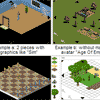
    pp3Diso is a jQuery plugin that allows the display and management of a 2D isometric map (or 3D isometric misnomer).

    Here are some of the possibilities offered by pp3Diso:

    • map size limited to 500×500 for a map,
    • ability to display multiple maps without reloading the page
    • Layer to layer for buildings and objects,
    • management and display an avatar (or not)
    • management and display a cursor 2 states,
    • displaying a user interface,
    • display of color zones,
    • display bubble-d’infos on objects or buildings, with relative or absolute positioning,
    • Display dialogue with freely configurable buttons,
    • zoom (possibility to zoom with the wheel)
    • pathfinding,

    EasyStar.js : Javascript A* Pathfinding library for HTML5 games

    EasyStar.js : Javascript A* Pathfinding library for HTML5 games

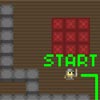
    A* is an algorithm for finding the shortest path between two points. It is very useful in game development. Any tile-based game that requires this kind of movement will probably utilize some form of A*. Tower Defense games, City Building games, Rogue-Likes, the list goes on.Thus EasyStar.js is a simple A* API written in Javascript.

    Features:

    • The ability to spread out your calculations over multiple calls. EasyStar.js lets you specify how many calculations should be performed each call.
    • The ability to add separate points to avoid, outside of those that are avoided based on tile type.
    • The ability to specify which tile types are walkable, and which are unwalkable.
    • EasyStar calls a callback if it finds your path, or if there is no possible path.

    How to create a Puzzle game using jQuery

    How to create a Puzzle game using jQuery

    Today we are making a simple puzzle game called “Fifteen”. The purpose of the game is to slide 15 square blocks around to form an image. The goal of this tutorial is to look at this simple browser-based game and explain how it was made line by line. It’s a great way to learn jQuery. For this tutorial, We will use a 2D image square-sliding game I created last week and I will go over each line of code to demonstrate the train of thought. I really do believe that breaking this game up into explanations on per-line basis will help you understand how to use jQuery in your own projects.

    jqPuzzle : Customizable Sliding Puzzles with jQuery

    jqPuzzle : Customizable Sliding Puzzles with jQuery

    jqPuzzle lets you easily create sliding puzzles for your web page. Select an image, put it in your page, and add some magic – jqPuzzle will automagically turn it into a full-blown sliding puzzle! If you want, you can highly customize and style your sliding puzzle according to your needs. The interface is available in several languages, and you can add your own texts on the fly.
    Since jqPuzzle is all JavaScript, your users won’t need any additional plugins or software. jqPuzzle is powered by jQuery, a powerful and straightforward JavaScript library. jQuery rocks!

    jQuery pinterest style gallery plugin

    jQuery pinterest style gallery plugin

    Pinterest style layout gallery is a lightbox support image and youtube, vimeo video.CSS3 driven animation, graceful degradation, it will toggle the fade transition in the old browser.Optional animation transition style.Optional go back animation delay.

    Make a snake game using HTML5 canvas and jQuery

    Make a snake game using HTML5 canvas and jQuery
    Learn to make a simple snake game using HTML5 canvas and Jquery.

    jPong – 3d pong created with jQuery

    jPong - 3d pong created with jQuery

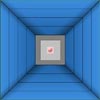
    It’s pretty amazing at how fast people can learn certain technologies. A couple of months ago, I learned my friend and ex-classmate Sidney te Grotenhuis some (basic) jQuery. Last week, he contacted me to show off his latest creation: jPong. I was blown away.

    By combining jQuery with a collision detection plugin, a line drawing plugin and some own scripting, he was able to create this game. Feel free to dig in the source code (comments were added) to see how it works. But for now, simply start the game and play.