

Product List – This could be your portfolio list, product list, image list, etc. Listing your products with displaying information when hovering thumbnails is useful when selling your products online. I am going to share a simple jQuery code & CSS code to achieve this trick.
Best jQuery Portfolio Plugins & Tutorials with Demo
Showbiz : jQuery Responsive Teaser WordPress Plugin

Showbiz Pro is a jQuery responsive teaser displaying solution that allows you to show WordPress Posts or any Custom Content with a set amount of teaser items.
Features:
- Display Posts and/or Custom Post Types (e. g. Portfolios)
- Fully Responsive & Mobile Optimized (Smartphones & Tablets)
- Drag & Scroll Function
- Smart Loading of Embeded Videos (YouTube and Vimeo)
- Light Weight jQuery and CSS
- Unlimited Slides
- iPhone & Android Swipe Touch enabled
- FullWidth and Single Width Reveals
- Customizable 100% via Plugin Parameters / CSS / HTML
- Easy installation in your Website
- Fast CSS3 & jQuery Engine
- Fancybox 2 Lightbox Plugin on Multi Domain License included ($89 Value)
- Set Amount of Entries in 4 Level for Responsive Look
- Drag & Scroll Function
MixItUp : A CSS3 and jQuery Filter & Sort Plugin

MixItUp is a light-weight but powerful jQuery plugin that provides beautiful animated filtering and sorting of categorized and ordered content. It plays nice with your existing HTML and CSS, making it a great choice for fluid, responsive layouts. It’s perfect for portfolios, galleries, blogs, or any categorized or ordered content!
MixItUp uses jQuery to decide which elements to hide, show or re-position based on your filters, and then applies the power of CSS3 transitions to smoothly animate these elements to their new locations. It’s an extremely efficient approach that makes the most of your modern browser’s rendering power, and avoids more resource-heavy approaches involving jQuery .animate() and position: absolute.
ZoomFolio : jQuery Portfolio Plugin

DZS ZoomFolio is the ultimate plugin for displaying your creative portfolio to your clients and that’s not all. You can use it to show the recent posts from your blog or a gallery from your vacation. The possibilities are endless.
Features:
- easy to install – install and get this plugin ready in less then one minutes.
- responsive – looks great from mobile to HD
- CSS3 technology – this gallery uses cutting-edge css3 definitions to render awesome 3D effects in supporting browsers, the others will degrade gracefully
- compatible with all major browsers, including IE – compatible from IE7 to IE10, Chrome, Safari and Firefox
- SEO friendly – built with search engine optimization on mind from the ground up, the ZoomFolio portfolio uses non hidden valid html markup to build the widget
- iPhone / iPad optimized – this gallery has been optimized for Apple touch devices
- Android optimized – this component has been tested on Android 4.0 and works awesome
Fullscreen Layout with Page Transitions with jQuery & CSS3
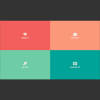
Today we’d like to share an experimental responsive layout with you. Initially, the layout shows four flexible boxes. When clicking on a box, it will expand to fullscreen and the others will scale down and fade out. When closing the current view, it will move back to the intial position while the other boxes come back up again. Another type of page transition can be seen on the works section where we will show a portfolio item by sliding in a panel from the bottom. The current view gets scaled down and disappears in the back.
All effects are done with CSS transitions and controled by applying classes with JavaScript. The whole layout is flexible and some media queries are added to size down things for smaller screens.
Showbiz Pro Responsive Teaser jQuery Plugin

Showbiz Pro is a highly customizable plugin to show you or your customer’s services, portfolio items, blog contents… basically all business information thinkable.
What makes this item unique is that you can define everything(Captions, Preview, Details etc.) via CSS or HTML or jQuery plugin option which gives you Unlimited Layout Possibilites. Please check out the examples to see for example how a small preview view expands to a rich detailed panoramic view. All fits nicely in the designated area.
Features:
- Fully Responsive & Mobile Optimized (Smartphones & Tablets)
- Drag & Scroll Function
- Smart Loading of Embeded Videos (YouTube and Vimeo)
- Retina Ready Icons via Font Face Icons
- Unlimited Slides
- iPhone & Android Swipe Touch enabled
- FullWidth and Single Width Reveals
- Fast CSS3 & jQuery Engine
- Fancybox 2 Lightbox Plugin on Multi Domain License included ($89 Value)

Vertical Showcase Slider with jQuery and CSS Transitions
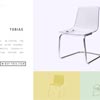
In this tutorial we will create a very simplistic and responsive product slider for an online store or a portfolio. The idea is to have different sections in a fullscreen view: the image or preview, a navigation and the description. When navigating through the items, we will slide the preview section and the section with the description in opposite directions. The idea for this kind of “opposite” transition comes from the beautiful website of the National LGBT Museum which moves the left and right side in the same manner when navigating or scrolling the page.
Portfolio Flipping Slider Using jQuery & CSS3

There are many ways on displaying our portfolio, one of them is using grid style with slider effect for pagination. In this tutorial I’m going to share about how to displaying our portfolio grid with flipping slider effect for pagination using jQuery & CSS3 Transform.
The slider will change our portfolio images when it’s flipping, this flipping effect is triggered by user click on the pagination. So when user click a page each of our portfolio images will flipping 360 degree and when its animation near end the image will changed with new image.
We will create four flipping effects that will be used for animation, there are : horizontal left direction, horizontal right direction, vertical top direction and vertical bottom direction. These effects will be randomly choosen when displaying the image.


