
In today’s short tutorial i would like to share a caption jQuery plugin that adds a caption to the bottom of images this is useful for displaying additional text about images when a user hover over the image.They say a photo is worth a thousand, and the best way of doing this is by adding captions to your images.
Best jQuery Image Hover Effect Plugins & Tutorials with Demo
Create Multiple pop up divs using the jquery

In this tutorial we are going to create a simple profile overview page containing 4 profile images and names. When we hover over the image or name a more detailed profile will appear. This div is positioned before the image and name link in the code and is initially hidden. When we hover over the image, a jQuery event will occur which will change the display declaration from hidden to block, making the div appear. This is when we make use of the prev() method.


Sliding Background Image Menu with jQuery
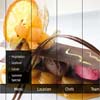
Today we want to share another jQuery menu with you. This menu will have several panels, each one corresponding to a different background image that will show on all panels when we hover over a panel label. Also, a submenu will slide out from the bottom. This menu comes with some configuration possibilities, such as the size of the image, the hover effect and custom default states.
CSS and jQuery-Creating an Image Slider

In this tutorial I am actually going to be explaining how to do something which I created for one of my other projects. Basically you are going to create a jquery effect. When a holder is hovered over the top image slides down to reveal the image underneath. I will also explain how to use position absolute to float an image in the top right to show the image is new.

jQuery & CSS Hover Zoom Effect Plugin

This plugin creates “Hover Zoom” effect for your image thumbnails with CSS and jQuery. This effect reverse zooms an image while fading in a label on top of it when the mouse hovers over it.I’ve seen similar effects to this one on a few sites here and there, and they were always built in Flash. I wanted a CSS and Javascript solution so I whipped up the Hover Zoom effect.